Finally, an update. I have had ideas for my blog all year, but it hasn't been a priority compared to other things I have going on. Veteran teachers, you know what I'm talking about. First year teachers, you may feel like you are barely swimming, but keep going! We are one week away from spring break, and almost at testing season. Once that's over, the pressure is off and we can relax and enjoy our time with our students.
How many of you are usually the last car in the parking lot, walking out when the sun is going down or already down? We don't have windows in our classrooms or auditoriums, and we don't see the sun when we leave, either. Don't let the lack of vitamin D get you down! Remember the tips from the previous entry about survival. We can do this!
My campus is always looking for ways to get disenfranchised students involved, even though we have a great fine arts program where many students are already involved. How can you get more students interested in drama? Have an official Drama Club! Some teachers use an official honor society, which is great for your dedicated kids who come to every audition. I'm talking about involving those kids that are flat out afraid to audition, or they can't commit to staying after school every day. Yeah, those kids. Here is what I require of my Drama Club:
1. Every September club members submit permission slips and membership dues for the entire year. Many districts require paperwork and a procedure for collecting money, and collecting dues up front saves time before events throughout the year. This year I charged $20.
2. Benefits of joining Drama Club: t-shirt, field trip to see a play, Christmas movie party, and Mystery Dinner party at the end of the year. At the first meeting, members design and vote on the year's t-shirt, and vote for officers.
3. Students vote on what Christmas movie to watch for the party and what play they want to go see.
4. Before the field trip, I collect a $5 fee to ensure that students will follow through and show up. Every year I have students who submit their permission slips for the play, I buy tickets, and they don't show. It also helps pay for those unused tickets or a bus if you need one.
5. I use www.nightofmystery.com for our Mystery Dinner Parties. I teach 6-8th grades, so I can use the same parties on a three year rotation. I like to play along, but this will be my fourth year doing them so I know the killer now. :) I cater in Zio's, they get character information in their invitation, and we have a blast. It's like a banquet, but more fun!
6. We hold one monthly meeting where we discuss the next upcoming event. I would love to include a service project, but with all the contests we have going on, I am finding a hard time to plan and execute one. Maybe something as simple as picking up trash along the roads to school. Still in the works!
I hope this helps you generate ideas to get more students involved in theatre. I have 60 kids in the Drama Club, and not all come to auditions for plays. They get to be a part of theatre without testing their fear of performance.
I'm hoping to add more to the blog and more to my store over spring break and in May! :)
Cheers!
Showing posts with label theatre arts. Show all posts
Showing posts with label theatre arts. Show all posts
Friday, March 3, 2017

Wednesday, September 9, 2015
Middle School Theatre Arts: Grading Made Easy!
I realize that my last post about Theatrefolk podcasts seems a bit rushed. It was very rushed; I tried to blog on my conference. HA! I tried to be productive on my conference; imagine that. I've decided if I'm going to write a coherent and helpful post I should wait until I'm not at school. Also, we've started our musical (Legally Blonde, Jr.!) so I'm hoping my posts won't disappear. No promises.
I had an interactive notebook quiz last week with all seven of my classes. In the past, they were quizzed over their warm ups and it was a disaster. I would ask what the entry was for four different dates and they would be writing the entire period and many failed because, let's face it, middle school students do not do warm ups. My school loves them, and I do, too, because they help to focus the kids and give them a task to do before and after the tardy bell so I can deal with issues before we start each class. Anyway... I don't want my kids to fail and putting so much weight on a warm up was not efficient. Instead, I am quizzing them on their interactive notebook. It's an open-notes quiz, and multiple choice. Instead of writing the entire period, they fill in a bubble on an answer document. Instead of spending too much time grading, I hold the answer document up to the camera on my laptop and it grades it for me! How, you ask?
GradeCam.
This little website is amazing! First you must create an account. I always use my school information when creating an account, that way I will always know it.
When you log in, your dashboard looks like this:

You must add all of your students. This seems daunting, but many gradebooks have an export feature. My district uses GradeSpeed and this link is on the left. You must click this link for each period and section you teach. It will automatically go to your Downloads folder.
In GradeCam, click on Classes and add a new one. Import your students through the file you created and hit next until they are all there. Do this for every class. It seems tedious, but it's worth it.
Once all of your classes are made, create an assignment. Make sure you create a key that is accurate!
To print forms for students, click on Forms. There are different options for the choices and such. I printed four copies, then cut and taped them to one paper and made several copies from there and use a paper cutter to cut them. Saves paper.

When students take the quiz or assignment, they must bubble in their GradeCam ID, which is the same as the last four digits of their ID that was imported with your roster. TIP: have them also write their name on the top. We know them by name, not numbers. So much easier when handing back.
Students can use pencil or pen. When you're ready to grade, click on the assignment and correct class period, and hold the answer document up to the camera until it makes a little noise. Viola! Graded! When I enter them into my district gradebook, I make each browser small and put them next to each other and just enter the grades. BAM! They are done in a few minutes! I cannot express how much time and paper and stress this little tool has saved me and it's only been one quiz!
For absent students, I place the class set of the questions with extra answer documents in a labeled folder in the dish rack I have next to the bookshelf. When a student presents me with an excused slip and asks what they missed, I can easily give them the documents and they can take the quiz in the hall. I can grade it in seconds and the grade is saved online to enter in later.
This can be used for quizzes, tests, take home assignments, etc.
We all need more time, and GradeCam gives us a bit more in our busy educator lives.
Cheers!
I had an interactive notebook quiz last week with all seven of my classes. In the past, they were quizzed over their warm ups and it was a disaster. I would ask what the entry was for four different dates and they would be writing the entire period and many failed because, let's face it, middle school students do not do warm ups. My school loves them, and I do, too, because they help to focus the kids and give them a task to do before and after the tardy bell so I can deal with issues before we start each class. Anyway... I don't want my kids to fail and putting so much weight on a warm up was not efficient. Instead, I am quizzing them on their interactive notebook. It's an open-notes quiz, and multiple choice. Instead of writing the entire period, they fill in a bubble on an answer document. Instead of spending too much time grading, I hold the answer document up to the camera on my laptop and it grades it for me! How, you ask?
GradeCam.
This little website is amazing! First you must create an account. I always use my school information when creating an account, that way I will always know it.
When you log in, your dashboard looks like this:

You must add all of your students. This seems daunting, but many gradebooks have an export feature. My district uses GradeSpeed and this link is on the left. You must click this link for each period and section you teach. It will automatically go to your Downloads folder.
In GradeCam, click on Classes and add a new one. Import your students through the file you created and hit next until they are all there. Do this for every class. It seems tedious, but it's worth it.
Once all of your classes are made, create an assignment. Make sure you create a key that is accurate!
To print forms for students, click on Forms. There are different options for the choices and such. I printed four copies, then cut and taped them to one paper and made several copies from there and use a paper cutter to cut them. Saves paper.

When students take the quiz or assignment, they must bubble in their GradeCam ID, which is the same as the last four digits of their ID that was imported with your roster. TIP: have them also write their name on the top. We know them by name, not numbers. So much easier when handing back.
Students can use pencil or pen. When you're ready to grade, click on the assignment and correct class period, and hold the answer document up to the camera until it makes a little noise. Viola! Graded! When I enter them into my district gradebook, I make each browser small and put them next to each other and just enter the grades. BAM! They are done in a few minutes! I cannot express how much time and paper and stress this little tool has saved me and it's only been one quiz!
For absent students, I place the class set of the questions with extra answer documents in a labeled folder in the dish rack I have next to the bookshelf. When a student presents me with an excused slip and asks what they missed, I can easily give them the documents and they can take the quiz in the hall. I can grade it in seconds and the grade is saved online to enter in later.
This can be used for quizzes, tests, take home assignments, etc.
We all need more time, and GradeCam gives us a bit more in our busy educator lives.
Cheers!
Friday, February 6, 2015
Interactive Notebook Ideas for Middle School Theatre Arts
I'm in my third year of teaching middle school theatre and finally feeling like I'm not constantly drowning. I've had my students complete a bell-ringer/warm up assignment in a notebook for the last two and half years so they can learn concepts and focus on theatre while I take care of housekeeping tasks and learning is still happening. I've decided my goal for next year is to implement interactive notebooks in my classroom and change the formatting of my bell-ringers.
Interactive notebooks are not new to me; I saw them in use by the wonderful elementary teachers I worked with as a special ed assistant. I recently took a workshop at TETA Theatrefest about the notebooks, which sparked my interest. I love colors and note-taking, but I also see how some kids don't like this. I, however, feel it would be a great way for them to learn concepts and complete assignments without loose-leaf paper. It can be something they are proud of with drawings, colors, and stickers.
I kept the notebook I received at the TETA workshop and I started creating sample lessons for middle school theatre at all levels. Below are some of the ideas I've come up with:
 Here's the cover. I know; it's simple. The workshop instructor made a good point when she said glued on images fray and fall off through the year. A simple cover with the student's name and class period works. These notebooks should be kept in the classroom, sorted by period.
 These two pages showcase a lesson about how our bi-annual speech tournaments work in my district. I used foldables and sticky notes to have students understand how sectioning works and which events to pick. I always have them create a goal they want to achieve so they can focus on that as they prepare for the tournament.
 This is a Theatre I lesson on stage directions. Have them paste in the grid and fill it out as a class. You could use stickies and foldables, as well.
 The above photo is a section about the UIL one act play unit set pieces. I teach in Texas, and UIL one act play contest = life! My job at the middle school level is to teach them the basics and give them experience with the contest before they go to high school. Our district contest is competitive and so much fun at the middle school level.
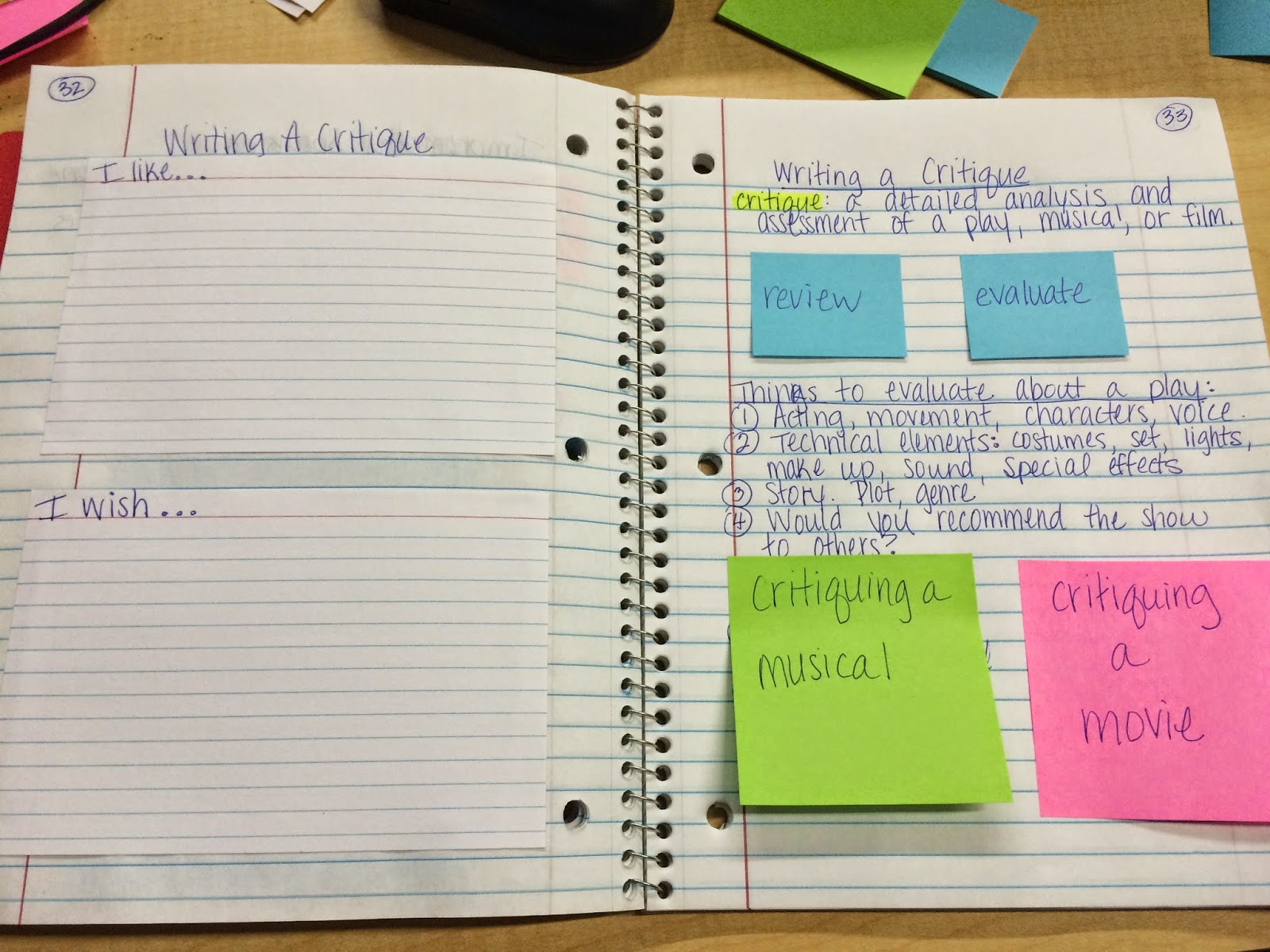 This is a lesson teaching the critique process for theatre, musicals, and film. Later in the notebook I can have them write a page-long, paragraph form critique based on this lesson.
.JPG) Envelopes are a fun idea! Students can keep show tickets in one throughout the year, and in this improv lesson they can keep character idea cards for when we play improv games. I also includes foldables for CROW and the Four Rules (Tina Fey!) of improv.
Envelopes are a fun idea! Students can keep show tickets in one throughout the year, and in this improv lesson they can keep character idea cards for when we play improv games. I also includes foldables for CROW and the Four Rules (Tina Fey!) of improv.
You can also use foldables for Character Analysis, External/Internal Characteristics, The Rehearsal Process, playwrights, careers, vocabulary, etc.
I know several teachers on my campus deal with warm ups and bell-rings differently. Some flip the notebook over and have them record the warm ups in the notebook that way. I've created a weekly template to use next year. They will keep it in their binder and turn it in every Friday. When it's graded they can cut out the warm up template and glue it on the next clean page in their notebook for reference. Open notes quizzes can be given.
I've seen the idea of sawing composition books in half for smaller notebooks, and I think I will do that for rehearsal notebooks for my after school shows. They are small enough to keep with their scripts and they don't need a ton of space for their individual notes.
Bookmarks can be added with tape and a ribbon on the back cover.
The possibilities are endless with interactive notebooks. There are plenty of free resources online, especially Pinterest.
Happy notebooking!
Kasey
Interactive notebooks are not new to me; I saw them in use by the wonderful elementary teachers I worked with as a special ed assistant. I recently took a workshop at TETA Theatrefest about the notebooks, which sparked my interest. I love colors and note-taking, but I also see how some kids don't like this. I, however, feel it would be a great way for them to learn concepts and complete assignments without loose-leaf paper. It can be something they are proud of with drawings, colors, and stickers.
I kept the notebook I received at the TETA workshop and I started creating sample lessons for middle school theatre at all levels. Below are some of the ideas I've come up with:
I know several teachers on my campus deal with warm ups and bell-rings differently. Some flip the notebook over and have them record the warm ups in the notebook that way. I've created a weekly template to use next year. They will keep it in their binder and turn it in every Friday. When it's graded they can cut out the warm up template and glue it on the next clean page in their notebook for reference. Open notes quizzes can be given.
I've seen the idea of sawing composition books in half for smaller notebooks, and I think I will do that for rehearsal notebooks for my after school shows. They are small enough to keep with their scripts and they don't need a ton of space for their individual notes.
Bookmarks can be added with tape and a ribbon on the back cover.
The possibilities are endless with interactive notebooks. There are plenty of free resources online, especially Pinterest.
Happy notebooking!
Kasey
Subscribe to:
Posts (Atom)